
Browsing "Older Posts"

Browsing Category "FACEBOOK"
If you try to publish a Facebook status update more than 500 characters you will get an error message: status update too long - "The status updates should be less than 500 characters. You have 909 characters entered here. Notes can be much longer. Would you like to edit and update your post as a note? "
How do you circumvent this limit? It's as smple as publishing a photo! Just upload a photo and the comment will be long enough to contain your post that you wanted to publish!

How to get around the 500 character limit

By vamshi → Saturday, September 24, 2011
We return with a new trick that is very useful to get the information :). This helps you find out what two people (profiles) have in common. Some time ago we told you about the friendship page that allows you to discover precisely what elements of Facebook users are shared between two, or which friends, which messages are exchanged, which events they attended together or even which pages have in common, and so on.
facebook-guida
On the same basis as that trick now we are providing a link that allows you to find out which two users share photos, in other words where the two users have been tagged.
What you need are the users' IDs. If you don’t know how to find a users ID read this. How to find out the ID of a user on Facebook. 5 Ways.
Once you have the ID of the users. Replace them at this link:
http://www.facebook.com/media/set/?set=m.ID1.ID2
Where ID1 ID2 and IDs are first found.
The page will give you the pictures shared by two users.
Obviously, the picture must be visible to you, then you will want to see photos shared by two users who are not your friends be able to see just the pictures public, or those with privacy set to NOT "just friends".

How to see photos shared between two users

By vamshi →
After the introduction of Facebook ' username , which is the function that allows everyone to have a user name on Facebook and a unique URL, now finding the user ID is not immediate.
For profiles that have not yet chosen a nickname finding the ID is a breeze, you can just look up the URL in the address bar of your browser when you visit their profile. Example:
http://facebook.com/profile.php? = 73322363
In this case the number at the end, 73322363 is the ID that identifies that user. But if the user has chosen a username, example:
http://facebook.com/pinco.pallino
To find the user ID you can not look at the profile URL.
Now to illustrate and explain some ways to find the user ID. The examples are based on the user we all know know on Facebook, Mark Zuckerberg, whose ID is the No. 4.
Method No. 1 - from photos
tab-foto-mark-ID
Visit the Photo tab of the user, and clicking on one of his albums (such as the profile picture) you will notice that the URL at the top will look like this:
http://www.facebook.com/media/set/?set=a.529237716211.2047231. 4
The first two numbers identify the link at the end of the album, the last (after the point) identifies the user!
The user ID is 4, that of Mark.
Method No. 2 - by info
tab-info-mark-ID
Visiting the information tab of your profile, if you notice a link "More" - hover the mouse over it and copy the URL. Here it is for our example:
http://www.facebook.com/ajax/profile/show_more.php?section_id=1003&profile_id = 4 & offset = 5
As you notice the ID is clearly visible.
Method # 3 - from updates
aggiornamenti-mark-ID
If the person has activated receive updates on the right side column you will see which friends receive updates. Rolling the mouse over it again will show the URL that contains the user ID:
http://www.facebook.com/browse/friended_followers_of/?profile_id = 4
Method # 4 - via the "Message"
messaggio-mark-ID
If you receive messages, try to send a message. the URL looks like this:
http://www.facebook.com/messages/ 4
Method # 5 - report link / block
segnala-blocca-mark-ID
Similar to the previous method, the link that points to block is like this:
http://www.facebook.com/ajax/report/social.php?content_type=0&cid=4&rid = 4 & h = AfgHV0rX ...
Where you can see the id = 4.
These are just some of the methods to find the ID of a user. Almost certain, using one of the methods outlined here will be able

HOW TO FINDOUT EMAIL ID OF FACEBOOK USER

By vamshi →

How to Delete Strangers Facebook AccountYou might wanna kill someone due to some really angry thing he attempted on you but killing is simply illegal and you cannot attempt that thing, but now question arises how to kill someone without getting noticed and caught, well the simple answer is delete his or her Facebook profile he will be automatically ruined because Facebook is heart for some people now days.
Well so today I am going to teach you a small method for deleting any ones Facebook Profile. Well this trick includes mainly Social Engineering you have to be a confidence person to attend any employee from Facebook Team and answer all their questions confidently.

JUST FOLLOW THESE STEPS
1. The first and the most important thing is the victims Facebook Username you can get that easily.
2. The next thing you need His/Her Email which he/she uses to sign in to his Facebook Account.
3. His/Her birth date which he/she has filled in his/her Facebook Profile.
4. Now simply create a fake Email ID on Gmail or yahoo with the First Name & Last Name same as on victim’s Facebook Profile.
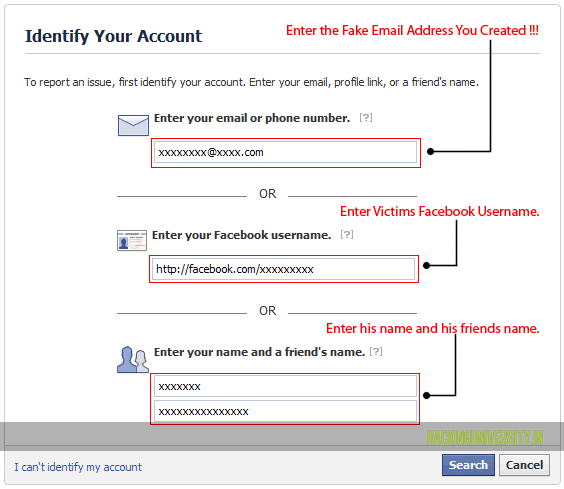
5. Now visit the Facebook Issue Reporting Page you will see something like below .:
How to Delete Strangers Facebook Account
6. Now as mentioned in the image fill all the data like above with your Fake Email Address and all other things and than click on continue.
7. Now you will get mail on your Fake Email Address entered above from Facebook Team asking you about the issue, tell them that you don’t have access to your account and someone has hacked your account and he is spoiling all your reputation and he is a threat to your profile, so you have to mail them convincing to disable and than delete your account.
8. Now after 2-3 days you will get mail from Facebook Team asking you that have you gained access to your Facebook profile, reply them you do not have any access to your Facebook profile and ask them to disable your account so that hacker have no access to the profile.
9. Now after 1-2 days you will get an Email that your account is disabled, and that’s we wanted to do and now if it will not be accessed for a while it will automatically be deleted.
So now enjoy and have fun, if you liked this post make sure to like it and share it with all your friends.

How to Delete Strangers Facebook Account

By vamshi → Friday, September 16, 2011


How to Hack Facebook Password: Facebook Password Hacker

Hacking Facebook Passwords
How to Hack Facebook Passwords by adding into friend list


These days many Facebook users have hundreds and possibly thousands of friends. More friends increase the chance that your Facebook account will be hacked – especially if you accept friend requests from people you do not know.


Critical vulnerability found on FACEBOOK


It isn’t entirely unusual that Facebook users receive friend requests from people they do not know. Often, those friend requests are blindly accepted in an effort to grow the friendship base. It seems that especially people with Facebook accounts that are primarily used for marketing purposes are more likely to accept friend requests from people they do not know than the typical Facebook user does.

Such accounts could be hacked easily, and there is no ingenious hacking talent required to do so: You simply need to walk through Facebook’s passwork recovery process with two other Facebook friends of a targeted account.

You can easily gain access to a your friends Facebook account through a collusion approach. You have to use Facebook’s password recovery feature, which is accessible through the “Forgot your password?” link on the Facebook login page.

Once identified the Friend, Facebook suggested to recover the password via the existing email address. However, you can bypass this hurdle by clicking the “No longer have access to these?” link. In that case, Facebook asks for a new email address. In the following step, Facebook presents the security question tied to the account. However, you can also to bypass the question by typing wrong answers three times in a row.After that, Facebook provides a rather surprising way to get your account back – via the support of three friends.

1. First, you select three friends “you trust”. These three friends then receive a code, which is required to change the account password.

2. Select yourself and immediately received a code from Facebook. With those three codes, you can easily change the password for the targeted account.

3. The problem clearly is that three friends you do not really know and cannot trust could potentially gain access to the victim Facebook account – through the standard password recovery feature.

4. To bypass problem mentioned in step 3. Create your own 2 more fake profiles and add the victim as a friend on facebook. Now get all the 3 codes and you are done.

NOTE: The targeted account will be locked for 24 hours after this password change and the user’s old email address receives a notification of the password change as well as the names of the three friends who were given the codes. However, if these are friends with fake names, it doesn’t quite matter that you now know their names.

Now if a Facebook user could in fact be in a situation when a Facebook account is not checked within a 24-hour period, particularly since we enjoy to flaunt our activities through Facebook status messages. And if the account is checked frequently, the account depends on Facebook’s response time, which can easily stretch to a number of days.
Bottom line is You don’t expose yourself to people you don’t know.

HOW TO HACK FACEBOOK PASSWORDS BY ADDING INTO FRIEND LIST

By vamshi → Tuesday, August 23, 2011

facebook tips tricks 20 Facebook Tips/Tricks You Might Not Know
If you surf Facebook on daily basis or occasionally, chances are you’re already familiar with regular stuffs like add/delete friends, update statuses, walls and profile, add and explore pages & applications, etc, but there’s more..
This week we want to cover some interesting things you can do on (or with) Facebook; inclusive of tricks that are not documented or unknown to many, as well as tips to stay connected better with your friends. Without further ado, here’s 20 Facebook Tips/Tricks You Might Not Know. If you have interesting tips/tricks related to Facebook, please feel free to share in the comment box below.
  1. How To Place Facebook Chat On Firefox Sidebar

    If you are using Firefox, you can place the Facebook Chat at the sidebar.
    Facebook Chat Firefox Sidebar 20 Facebook Tips/Tricks You Might Not Know
  2. How To Download Facebook Photo Albums

    FacePAD: Facebook Photo Album Downloader allows you to download your friends’ facebook albums, Events albums, and Group Albums, en masse, with the click of a button.
    facepad 20 Facebook Tips/Tricks You Might Not Know
  3. How To Share Flickr Photos To Facebook

    Flickr2Facebook is an unofficial Flickr to Facebook uploader(bookmarklet) which allows you upload photos to Facebook from Flickr.
    flickr2facebook 20 Facebook Tips/Tricks You Might Not Know
  4. How To Update Facebook Without Using Facebook

    hellotxt and Ping.fm both introduced features that let Facebook administrators update Facebook Pages.
    hellotxt 20 Facebook Tips/Tricks You Might Not Know
  5. How To Schedule Facebook Messages

    Sendible lets you schedule Facebook messages ahead of time so you can send messages to your friends, customers or colleagues in the future.
    sendible 20 Facebook Tips/Tricks You Might Not Know
  6. How To "Friend" Someone On Facebook & Hide It From Your Status Updates

    A short tutorial on Makeuseof to guide you how to hide Facebook status updates and keep that fact confined to your closer friends.
    hide status 20 Facebook Tips/Tricks You Might Not Know
  7. How To Create A Photo Collage Using Pictures Of Your Facebook Friends

    Click on Friends tab. Proceed to More tab. From "Choose an option" dropdown, choose any of the dashes "—" . Your Facebook friends collage is right on your computer screen.
    photo collage 20 Facebook Tips/Tricks You Might Not Know
  8. How To Know When Facebook Friends Secretly Delete Or Block You

    This service has been discontinued. X-Friends is a unique tool for tracking friends that disappear from Facebook.
    X friends 20 Facebook Tips/Tricks You Might Not Know
  9. How To Display Selected Pictures Only On Your Facebook Profile Page

    A little-known feature in Facebook that lets you decide who shows up in that Friends box. Click that "edit" pencil in your Friends box and type the names of your best friends in the box that says "Always show these friends"
    friend photos 20 Facebook Tips/Tricks You Might Not Know
  10. How To Remove Facebook Advertisements

    This Greasemonkey script – Facebook: Cleaner removes many of the annoying ads and updates that unavoidably appear on your Facebook pages.
    ads 20 Facebook Tips/Tricks You Might Not Know
  11. How To Syncs Photos Of Facebook Friends With Contacts In Microsoft Outlook

    OutSync is a free Windows application that syncs photos of your Facebook friends with matching contacts in Microsoft Outlook. It allows you to select which contacts are updated. So you can update all contacts at once or just a few at a time.
    outsync 20 Facebook Tips/Tricks You Might Not Know
  12. How To Display Facebook Statuses On WordPress Blog

    The following method make use of Facebook status feed and WordPress RSS widget to display Facebook Statuses on WordPress blog.. It will also work for self-host WordPress blogs.
    statuses 20 Facebook Tips/Tricks You Might Not Know
  13. How To Post Your Blog Posts To Your Facebook Wall Automatically

    Wordbook allows you to cross-post your blog posts to your Facebook Wall. Your Facebook “Boxes” tab will show your most recent blog posts.
    wordbook 20 Facebook Tips/Tricks You Might Not Know
  14. How To Access Facebook Chat On Desktop

    Gabtastik and digsby let you keep Facebook chat sessions open on your Windows desktop outside of your regular web browser, using minimal screen real estate and system memory.
    gabtastik 20 Facebook Tips/Tricks You Might Not Know
  15. How To Create Quiz On Facebook Easily

    LOLapps provides quiz creator that can be employed to conjure up these popular personality quizzes that are so widespread in Facebook.
    lolapps 20 Facebook Tips/Tricks You Might Not Know
  16. How To Hide Your Online Status On Facebook Chat From Select Contacts

    Facebook has integrated friends list with Chat and you can also choose which of these list members get to see you online.
    hide 20 Facebook Tips/Tricks You Might Not Know
  17. How To Get Facebook Updates On Email

    NutshellMail consolidates your Facebook accounts through the inbox you use the most.
    nutshellmail 20 Facebook Tips/Tricks You Might Not Know
  18. How To Update Facebook Status From Firefox

    FireStatus is a status update utility for multiple social networks, including FaceBook.
    firestatus 20 Facebook Tips/Tricks You Might Not Know
  19. How To Get Facebook On Your Desktop

    Seesmic Desktop, Facebooker, Xobni, Facebook Sidebar Gadget, Scrapboy and Facebook AIR application are desktop applications that allows you interact with your stream just as you would on Facebook, but without the browser.
    desktop apps 20 Facebook Tips/Tricks You Might Not Know
  20. How To Delete, Cancel And Terminate Facebook Account And Profile

    A simple guide to terminate, delete or cancel Facebook account, together with the Facebook profile easily.
    terminate 20 Facebook Tips/Tricks You Might Not Know.

20 Facebook Tips/Tricks You Might Not Know

By vamshi → Monday, August 8, 2011

Blog Archive